
summary::marker {
display: none;
content: "";
}
#plus details > summary::marker {
display: none;
content: "";
}
#plus details > summary .plus {
content: url("https://cf.value4it.com/share/common/rc/Clevetura/CLVX_1/plus.png");
width: 50px;
padding: 5px;
position: absolute;
bottom: 0;
right: 0;
}
#plus details .plus-content {
height: 0%;
opacity: 0%;
transition: 0.4s all ease;
}
#plus details[open] .plus-content {
height: 100%;
transition: 0.4s all ease;
opacity: 100%;
}
#plus details[open] > summary .plus {
content: url("https://cf.value4it.com/share/common/rc/Clevetura/CLVX_1/minus.png");
width: 50px;
padding: 5px;
position: absolute;
bottom: 0;
right: 0;
}
.clev_frame {
position: relative;
border: solid 10px #ececec;
border-radius: 30px;
overflow: hidden;
}
.frame_one {
background-image: url(https://cf.value4it.com/share/common/rc/Clevetura/CLVX_1/1-1.webp);
background-size: contain;
background-repeat: no-repeat;
overflow: hidden;
}
.frame_four {
background-image: url(https://cf.value4it.com/share/common/rc/Clevetura/CLVX_1/1-4f.webp);
background-size: contain;
background-repeat: no-repeat;
background-position: top center;
overflow: hidden;
}
.plus {
cursor: pointer;
scale: 1;
transition: 0.4s all ease;
}
.plus:hover {
cursor: pointer;
scale: 1.1;
transition: 0.4s all ease;
}
.dummy_sq {
aspect-ratio: 1 / 1;
}
.dummy_sq2 {
aspect-ratio: 295 / 377;
}
#clevetura-rich .hide-bar {
max-height: 800px;
scroll-behavior: smooth;
overflow: scroll;
}
#clevetura-rich .hide-bar::-webkit-scrollbar {
display: none;
}
#clevetura-rich .hide-bar {
-ms-overflow-style: none;
scrollbar-width: none;
}
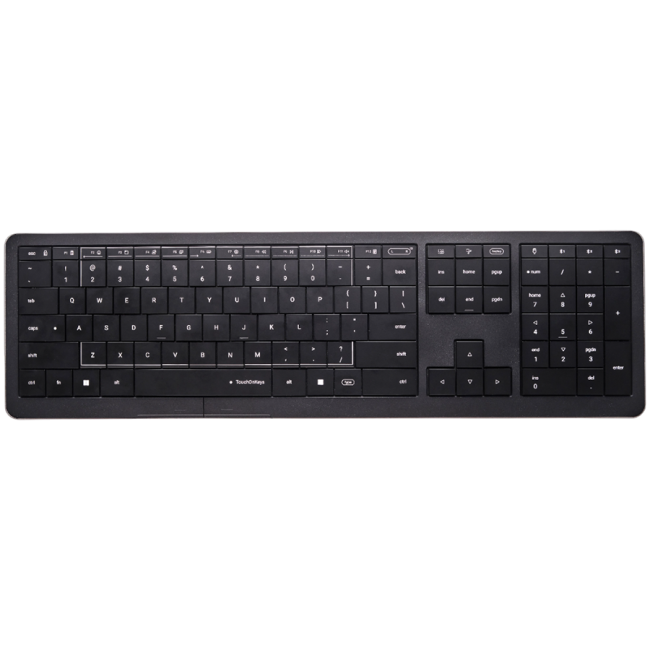
CLVX 1 Gesture Keyboard Compatible with Windows, macOS, Linux More possibilities than any other keyboard Speeds up workflow, saves spaceCLVX 1 in actionTop featuredTouch SlidersTouch Sliders are the new way of control: fast and intuitive. Their location is fixed, so you don’t need to look at them. Touch Sliders are fully programmable in TouchOnKeys AppScissors mechanical keysWhen typing, the touchpad is blocked. When making gestures, it functions as a touchpad. The Type and Touch modes switch automatically with a help of TouchOnKeys® technology.3x Bluetooth + USB-CWireless operation and connection of up to 4 devices.
CLVX 1 has full macOS compatibility now!Install the driverWith the latest firmware update (v5.3), all CLVX 1 users can gain access to native Apple trackpad gestures and macOS key layout support — delivering a seamless experience across platforms.Stunning BacklightPer-key RGBExperience the captivating brilliance of 131 carefully designed per-key addressable RGB LEDs. Backlight is fully customizable in the app.Gesture BacklightGesture Backlight gracefully follows your touches, providing intuitive on-keyboard feedback.Auto Brightness ControlEnjoy automatic backlight brightness adjustment, which adapts to ambient lighting conditions for optimal visibility.Adaptive IntelligenceAI personalisation of type/touch switching based on typing habitAdaptive Intelligence allows you to tune auto type/touch switching by training the gesture keyboard or manually. How it worksTouchOnKeys App
More personalization
Create custom profiles for your apps. Program gestures. Tune Touch Sliders. Adjust backlight effects. Assign functional keys.
Discover the AppDiscover More There are two ways to click — tap without pressing the key or click physical click button under spacebar. For folks who type with two hands, we’ve designed a special feature that doesn’t require you to lift both hands from the touch area when gesturing — Magic Touch Zones.You could also select your primary hand in TouchOnKeys App. Control your PC with one touch. Use the standard touch sliders settings to adjust the brightness of the backlight or sound. Or assign your actions via the TouchOnKeys App.Instant control without needing to move your hands from the keyboard. It’s simple and easy, offering a better way to interact with your PC. When typing, the touchpad is blocked. When making gestures, it functions as a touchpad. The Type and Touch modes switch automatically, indicated by the spacebar." />
Touch Sliders are the new way of control: fast and intuitive. Their location is fixed, so you don’t need to look at them. Touch Sliders are fully programmable in TouchOnKeys App
Scissors mechanical keys
When typing, the touchpad is blocked. When making gestures, it functions as a touchpad. The Type and Touch modes switch automatically with a help of TouchOnKeys® technology.
3x Bluetooth + USB-C
Wireless operation and connection of up to 4 devices.
With the latest firmware update (v5.3), all CLVX 1 users can gain access to native Apple trackpad gestures and macOS key layout support — delivering a seamless experience across platforms.
Stunning Backlight
Per-key RGB
Experience the captivating brilliance of 131 carefully designed per-key addressable RGB LEDs. Backlight is fully customizable in the app.
Gesture Backlight
Gesture Backlight gracefully follows your touches, providing intuitive on-keyboard feedback.
Auto Brightness Control
Enjoy automatic backlight brightness adjustment, which adapts to ambient lighting conditions for optimal visibility.
Adaptive Intelligence
AI personalisation of type/touch switching based on typing habit
Adaptive Intelligence allows you to tune auto type/touch switching by training the gesture keyboard or manually.
How it works
TouchOnKeys App
More personalization
Create custom profiles for your apps. Program gestures. Tune Touch Sliders. Adjust backlight effects. Assign functional keys.
There are two ways to click — tap without pressing the key or click physical click button under spacebar.
For folks who type with two hands, we’ve designed a special feature that doesn’t require you to lift both hands from the touch area when gesturing — Magic Touch Zones.
You could also select your primary hand in TouchOnKeys App.
Control your PC with one touch. Use the standard touch sliders settings to adjust the brightness of the backlight or sound. Or assign your actions via the TouchOnKeys App.
Instant control without needing to move your hands from the keyboard. It’s simple and easy, offering a better way to interact with your PC.
When typing, the touchpad is blocked. When making gestures, it functions as a touchpad. The Type and Touch modes switch automatically, indicated by the spacebar.
Za boljšo uporabniško izkušnjo in delovanje spletne strani uporabljamo piškotke. Z nadaljevanjem potrjujete njihovo uporabo. Preberi več v Politiki zasebnosti.